It Worked on My Machine
What has to travel with the code?
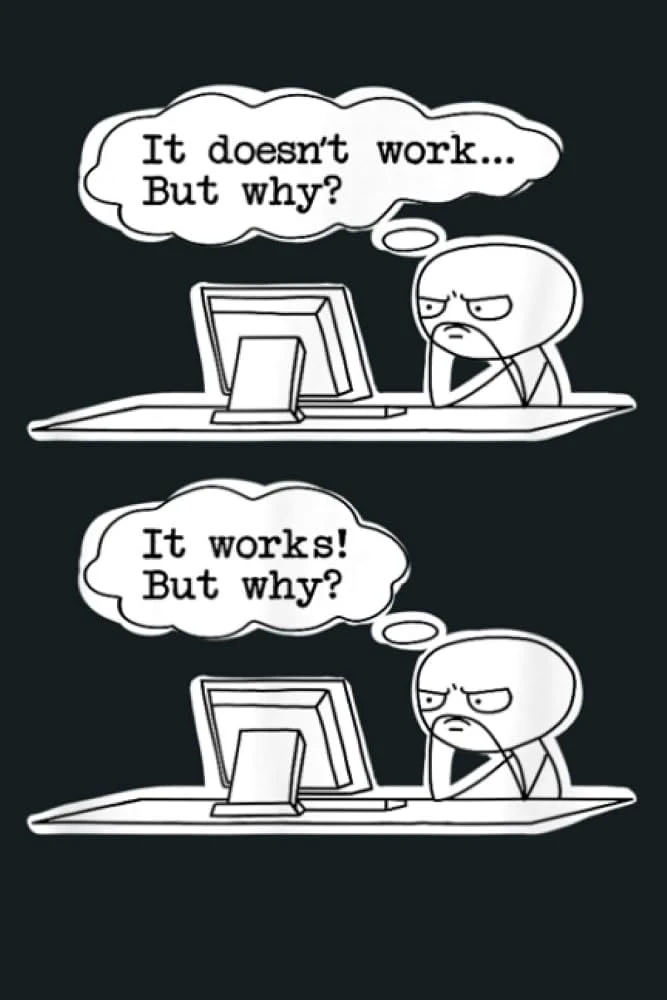
Python Was Meant to Be Portable
I keep running into the same problem. I build a small Python tool on Linux, get it working, then try to hand it to somebody using Windows. A package fails to install, a path points somewhere that doesn’t exist or a database expects a slightly different incantation. None of this is especially mysterious once I’m looking at the machine. That isn’t much comfort to the person waiting for the tool.
I’m not handing these applications to a room full of software engineers. They go to nurses, researchers and project staff who already have research work in front of them. They need the result, not a guided tour through the disagreement between Windows and Linux. The handover often ends with the laptop coming back towards me. The error message may as well say that the tool still belongs to my machine. I can usually repair it, although each repair adds another condition. Install this first. Use this version. Run the command from this folder. Try the other command if that fails.
For a while, longer instructions feel like the responsible answer, then the instructions begin needing instructions. Python was meant to be portable. The code was. The world around it was not.
The Machine Was Part of the Program
I like to imagine that an application is a pure logical object that can be zipped up and executed anywhere. In practice, it is larger than the source tree. It includes the Python version, packages, system libraries, database, paths, permissions, environment variables and a collection of assumptions I no longer notice because my own machine already satisfies them. Moving only the source code breaks that relationship. The files arrive, but the conditions that made them work remain behind.
My first attempt is to standardise the host machine. The setup guide grows one line at a time, usually after somebody has found another way for the installation to fail. It works reasonably well while the target machines still resemble the one described by the document, but they don’t stay that way. Somebody installs another package. A global library changes. A path is renamed. The next Windows machine isn’t quite the previous Windows machine.
I thought I was documenting the application. Mostly I was documenting yesterday’s computer. Docker becomes interesting at that point, not because it removes the machine, but because it lets more of the machine become part of what I hand over.
The Setup Became a File
Docker changes the practical question. Instead of asking somebody to recreate an environment by following my notes, I can describe much of that environment in a file and let the machine build it. Before this, setup lives in several unreliable places. Some of it is in my head, some is in shell history, and the rest is in a document that becomes less accurate each time the host changes. With Docker, the description can sit beside the code and change with it.
The first attraction isn’t scale or cloud infrastructure. It is the ordinary relief of being able to rebuild the same room without remembering how I arranged it last time. That room still has walls, and it is worth being clear about what they are made from.
Three States of the Same Room
Docker became easier for me once I stopped treating it as one mysterious thing and separated the Dockerfile, the image and the container.
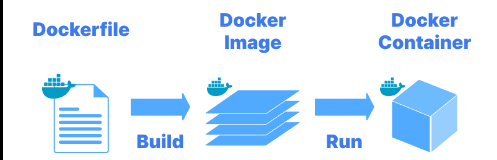
The Dockerfile becomes an image. The image becomes a running container.
A Dockerfile is a text recipe rather than YAML. It describes which base environment to begin with, which packages to install, where the code should live and which command should run when the environment starts. The file can be as plain as this.
FROM python:2.7

WORKDIR /app

COPY requirements.txt /app/
RUN pip install -r requirements.txt

COPY . /app

CMD ["python", "app.py"]
That file is not the application. It is a small map of the world the application expects to wake up inside. Docker reads the file and builds that world as an image, stored and ready to be used. When the image is running, the resulting instance is the container.
The commands can be simple.
docker build -t my-python-app .
docker run -p 5000:5000 my-python-app
This changes the day-to-day work more than the commands suggest. The environment is no longer a sequence I have to reconstruct before I can trust the application. If a running container becomes strange, I can stop it, rebuild from the image and try again. Deleting a working environment felt reckless when the environment existed only through accumulated setup. It feels different when the instructions that produced it are still there. The running instance can be disposable because its origin is not.
The Machine Beneath the Machine
VirtualBox gives me a complete second computer inside the first. It has its own operating system, kernel, virtual disk and allocation of memory. That is useful, although preserving the whole machine can feel excessive when the actual requirement is one application with a known set of dependencies.
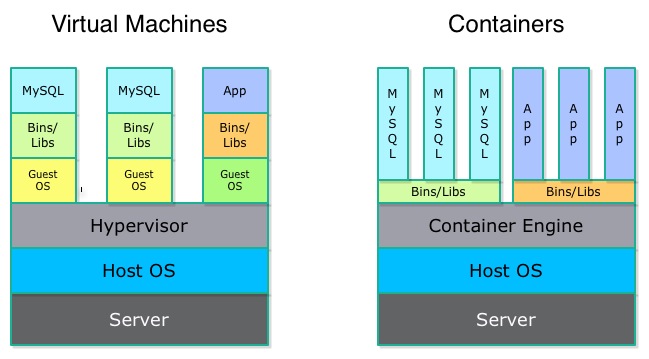
VirtualBox preserves a whole machine. Docker gives the application a bounded environment.
A container doesn’t bring a complete operating system kernel with it. It shares the Linux kernel underneath while receiving its own bounded view of files, processes, networks and dependencies. The difference is not merely that Docker feels lighter. The unit being preserved has changed.
On Windows, the arrangement is slightly comic. Docker still needs Linux underneath, so Boot2Docker provides a small Linux virtual machine, commonly through VirtualBox. Docker doesn’t make VirtualBox disappear for me straight away. It stops me treating that virtual machine as the precious development environment that must never change. VirtualBox becomes the machine beneath the boundary. Boot2Docker supplies Linux. Docker uses namespaces and control groups to give the application its room. There are more layers than the word container first suggests, but I’m still preserving less of the wrong thing.
What Crosses the Boundary
The useful test is what I no longer have to ask somebody else to install by hand. The image can carry the Python version, pip dependencies, system packages, runtime assumptions, startup command, exposed ports and enough of the Linux environment to make the application behave consistently. The handover becomes smaller because the recipient no longer has to reproduce every decision that created my development machine.
That matters in research. A data script, cleaning tool, small web application or reporting pipeline is rarely only its source code. The result may depend on a library version, a system package or some other part of the environment that nobody thought to record because it was already present. Carl Boettiger’s paper on Docker for reproducible research describes the same problem at the level of scientific work. Reproducing an analysis requires more than receiving the script. The surrounding environment is part of the evidence.
That is closer to what I want. I’m not trying to produce a grand cloud strategy. I want to hand somebody a useful tool without making them reconstruct my machine from memory, especially when the reconstruction has nothing to do with the research they are trying to complete.
What Stays Outside
The boundary doesn’t contain everything. The host kernel remains underneath it, and if the application depends on a particular kernel feature, the container cannot manufacture one. Sharing that kernel also means a container should not be mistaken for a perfect security boundary.
Persistent data needs separate thought as well. A disposable container is a poor home for anything that must survive it. Important data belongs somewhere deliberate, perhaps in a mounted directory, a volume or a database whose life isn’t tied to one running instance.
Secrets remain awkward. Docker doesn’t decide how several services should find one another, where trust should sit or what happens when one of them fails. It can reproduce a poor design with great consistency, which is useful in one sense and not especially reassuring in another. This is probably the limit I needed to see. Docker doesn’t make complexity disappear. It separates some of it from the host and leaves the rest where I can no longer pretend the container has solved it.
The Shape of the Mess
Docker turns setup from a memory problem into something closer to source material. I can inspect the description, rebuild the environment and discard a running instance without losing the path that created it.
The change is modest until I hand the application to somebody else. Instead of asking them to repeat a set of machine rituals they didn’t choose and don’t need to understand, I can give the application a boundary that the machine knows how to rebuild.
I thought Python portability meant the code would travel. Docker has made the missing part visible. The environment has to travel as well, or at least enough of it to stop every new machine becoming a fresh installation experiment. That solves the problem of one application. It does not yet tell me what happens when the application becomes several containers, each with its own state, dependencies and reasons to fail.
Comments